
Why More Content Loses in Answer Engine Optimization
Why more content loses in answer engine optimization: 147 posts on this site produced 13 cited URLs. Engines quote a distinct current passage, not the biggest library.



Cloudflare AI crawler settings block Googlebot only where Block is selected. Since September 15, 2026, Disallow AI Training stops other training crawlers and keeps search, and Cloudflare says existing settings carried over. Fewer than 1% of its sites block Search bots.
Cloudflare AI crawler settings can block Googlebot, but only where someone chooses Block. Since September 15, 2026, Cloudflare's Block and Block on pages with ads options also stop Googlebot, Bingbot and Applebot, search included, while a new Training option, Disallow AI Training, keeps search open. Cloudflare says existing settings carried over on their own, and earlier Training blocks moved to Disallow AI Training.
Advice written over the summer can describe Cloudflare's July 1 plan, which would have blocked Googlebot for any site blocking AI training. What shipped in September changed that. Below are the two, side by side from Cloudflare's own pages, and how to check your site.
On July 1, 2026, Cloudflare's developer changelog said "all customers," including "those on the Free plan," can now manage AI crawlers "based on what they actually do on your site," grouped into "three behaviors you can control independently: Search, Agent, and Training." The same entry said that from September 15, 2026, new domains would get Training and Agent bots "blocked on pages that display ads, while Search remains allowed."
The July 1 blog post added the part that caused the worry. Because defaults would be "enforced by the most restrictive applicable rules," it said, "multi-purpose crawlers such as Googlebot, Applebot, and BingBot will be blocked by customers who have selected to block Training (either through the new options to manage AI traffic, or through the legacy Block AI bots service)."
I knew this setting was there, because we have used Cloudflare for a long time. For a while we used it to keep every bot off our own sites, even at the risk of losing rank and AI citations. We host all of our sites, so we see how much automated traffic reaches them: how often pages get scraped, how many crawlers come through, and how much comes from known bad actors and many different countries. That is normal today, as covered in the attack baseline every small website faces, and it is why we built LTFI's security suite to watch that traffic and act on it.
On September 15, Cloudflare published a second post describing what actually shipped. It added a Training option: "To stop training and *keep* search, use Disallow AI Training." It confirmed that "Block and Block on pages with ads now apply to mixed-use crawlers, including Applebot, Bingbot, and Googlebot." And it moved existing sites to the safer option: "Previous Training selections of Block or Block on pages with ads will migrate to Disallow AI Training."
| Question | July 1, 2026 plan | September 15, 2026, as shipped |
|---|---|---|
| Choosing Block for Training | Also blocks Googlebot, Applebot and BingBot | Still blocks them, search included |
| Earlier Training blocks | Would also block those crawlers | Migrated to Disallow AI Training |
| Existing sites overall | New defaults aimed at new domains | "Your current settings carry over on their own." |
| New domains | Training and Agent blocked on pages with ads, Search allowed | One of two presets offered (blog); Allow for all three (docs) |
| Block AI Bots and Managed robots.txt | Legacy Block AI bots still counted | Both deprecated |
The September post also says "“Block AI Bots” will be deprecated in favor of the more granular Search, Training, and Agent controls," and Managed Robots.txt "in favor of Bot Preference Sync." If a past vendor switched on either one, check the newer controls.
Only if Block or Block on pages with ads is selected. For an existing site, Cloudflare's answer is: "Nothing, in almost every case. Your current settings carry over on their own." And: "If you want mixed-use crawlers gone entirely, you now have to say so. Select Block." It warns that this "will stop Applebot, Bingbot, and Googlebot from reaching your site," search included.
Googlebot, Bingbot and Applebot collect pages for both search and AI, so one block cannot tell those jobs apart. Cloudflare's current documentation (modified November 2, 2026) says "Training actions also apply to mixed-purpose crawlers used for both Search and Training."
Most sites keep search open in their Cloudflare AI crawler settings. Cloudflare's September post says "less than 1% of Cloudflare sites choose to block Search bots," while "17% of sites choose to enable some mechanism to block training." The post gives no measurement date for those two figures.

Cloudflare's July 1 post defines Search as "any behavior that collects or indexes your content, so it can answer questions about it later," Agent as behavior "that is acting, usually in real time, on a person's behalf, to get something done right now," and Training as "a crawler taking your content to train or fine-tune a model." The options are Block, Block on pages with ads and Allow, plus Disallow for Training.
The AI companies run separate crawlers for these jobs, and each documents its own controls:
Cloudflare's September post says Google lets site owners "opt out of training by adding a Disallow rule to robots.txt for “Google-Extended”," and that with Disallow AI Training, Bot Preference Sync "publishes the applicable no-training preference in robots.txt."
Cloudflare says Microsoft is "currently building the mechanism to also respect a “no training” preference," with support "targeted for early 2027," and that "Until that support launches, selecting Disallow AI Training will not automatically convey a no-training preference" to Microsoft. Bingbot keeps search access, which matters for the reasons in why the Bing index still matters for Copilot citations.

Training is now the largest single purpose. Cloudflare's July 1, 2026 bot report says "52% of crawler requests are now for AI training as of June 2026, up from 22% in Spring 2025," and that "Mixed-use crawlers (those blending search, agent use, and training) represent over 36% of activity."
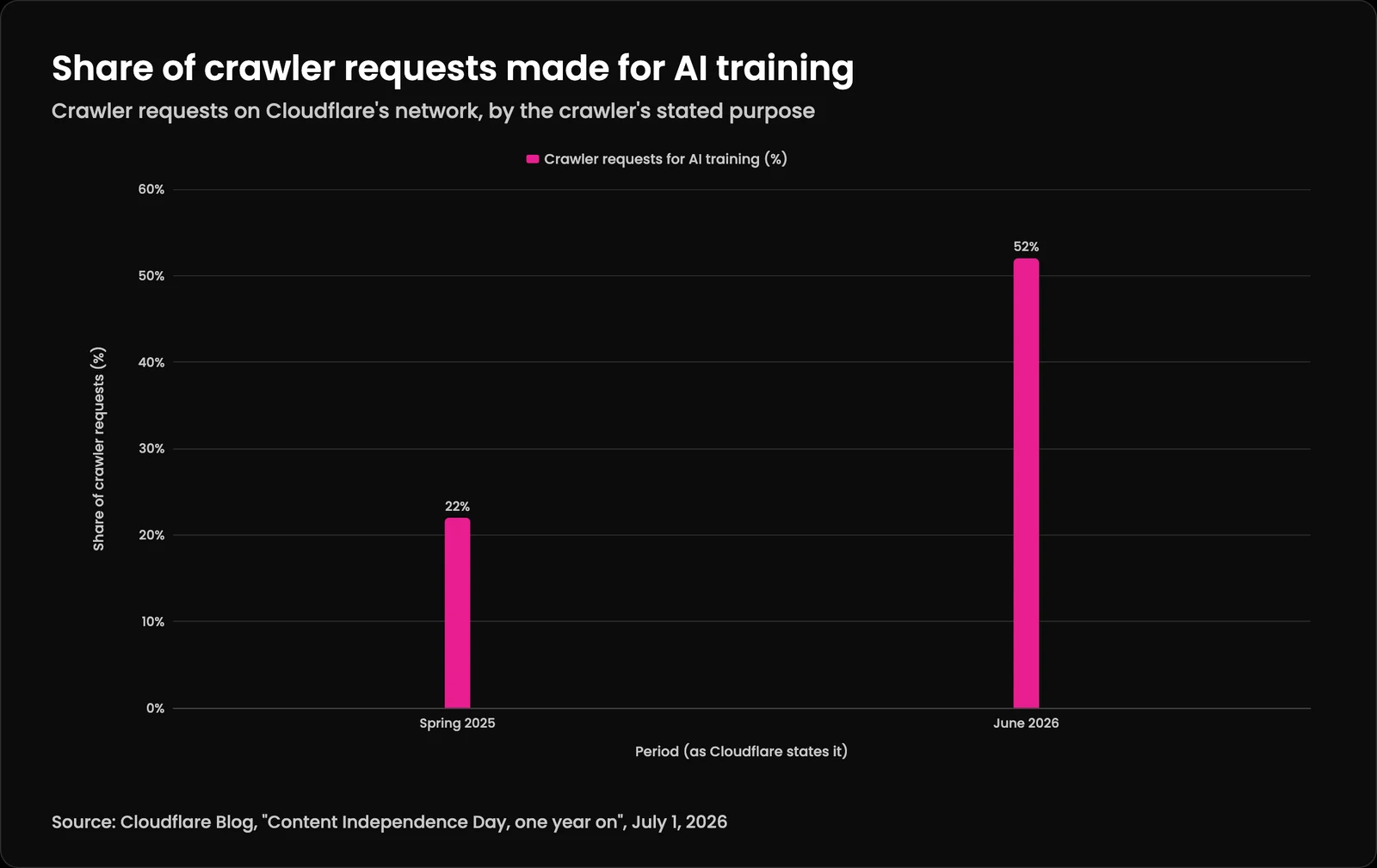
| Period | Crawler requests for AI training (%) |
|---|---|
| Spring 2025 | 22% |
| June 2026 | 52% |
In 2025, Googlebot alone sent far more traffic than any AI crawler. In the Cloudflare Radar 2025 Year in Review (December 15, 2025), Googlebot "was responsible for over 28% of traffic from Verified Bots." OpenAI's GPTBot, "which crawls content for AI training," was next at "about 7.5%," and Bingbot "generated 6%." Across categories, "Search engine crawlers were responsible for 40% of Verified Bot traffic, with AI crawlers generating half as much (20%)."
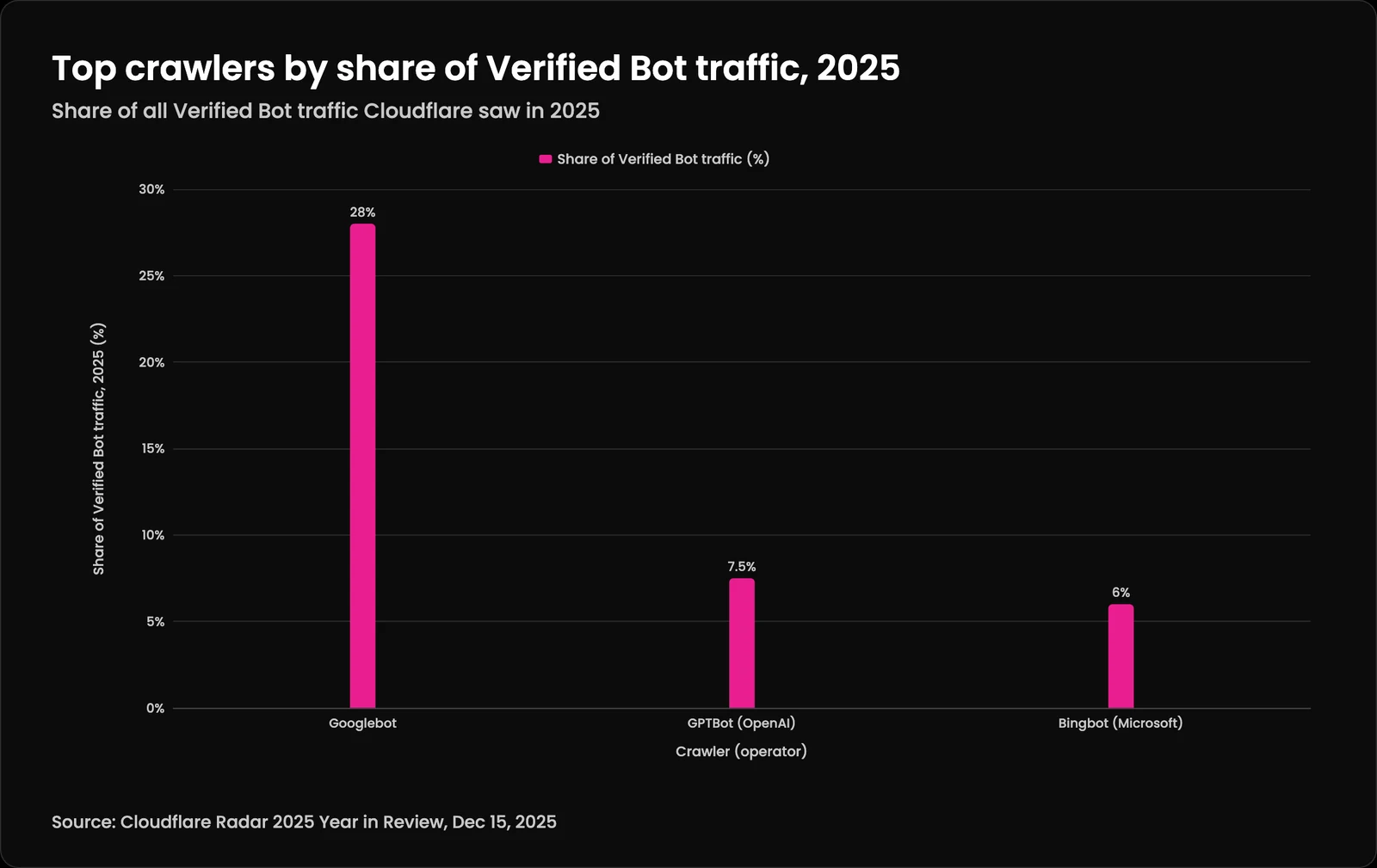
| Crawler | Share of Verified Bot traffic (%) |
|---|---|
| Googlebot | 28% |
| GPTBot (OpenAI) | 7.5% |
| Bingbot (Microsoft) | 6% |
Within AI crawling alone, training dominated. Cloudflare's August 29, 2025 post on the crawl-to-click gap says "Over the past 12 months, 80% of AI crawling was for training, compared with 18% for search and just 2% for user actions." That is the newest full three-way split Cloudflare has published, and its categories predate the July 2026 Search, Agent and Training labels.
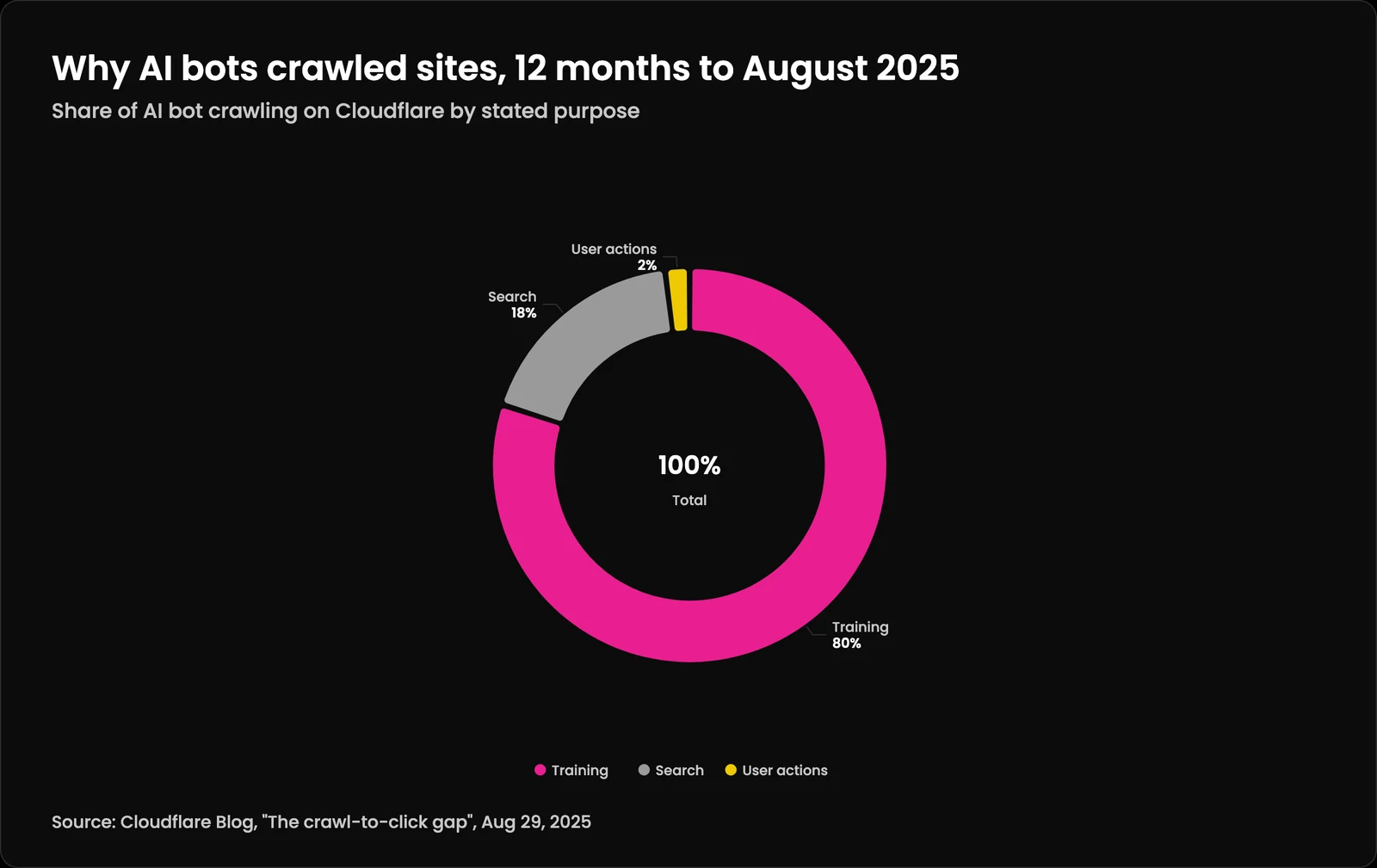
| Crawl purpose | Share of AI crawling (%) |
|---|---|
| Training | 80% |
| Search | 18% |
| User actions | 2% |
The 52% is a share of all crawler requests and the 80% a share of AI crawling only, so they are not a trend. Your server logs see these crawlers whether or not your analytics tag does, the gap in what the server sees that analytics miss.
We look at all of it, in a specific order, because what your site says is allowed and what your servers actually let through can be two different things. Each check takes a few minutes with the right logins:
Disallow: / blocks everything, and what it says about Googlebot, Bingbot, OAI-SearchBot, Claude-SearchBot, PerplexityBot and Google-Extended. The mistake I've seen most is blocking every AI bot when the owner only meant to opt out of training. Most AI companies split their bots by job: training (GPTBot, ClaudeBot, and the Google-Extended token), search (OAI-SearchBot, Claude-SearchBot, PerplexityBot) and user-triggered fetchers (ChatGPT-User, Claude-User) (see the vendor list above). Block the search crawlers and assistants can't pull current answers from your site. Anthropic says blocking Claude-SearchBot "prevents our system from indexing your content for search optimization."New domains may start differently. Cloudflare's September post says they "will be offered one of two preset configurations": all Allow for sites without ads, and Disallow AI Training with Agent on Block on pages with ads for ad-supported sites. The docs say "For new domains, Search, Agents, and Training use Allow (do not block) by default." For a domain added after September 15, read its settings.
None of these checks of your Cloudflare AI crawler settings can happen without the login. My advice: don't panic, and don't assume your website is being held hostage. Cloudflare is usually not where your domain lives; it is the traffic cop in front of your site. The real keys belong to whoever controls your domain registrar, such as GoDaddy, Namecheap or Squarespace. This is the order we walk an owner through, without breaking the site or email:
The crawler check also belongs in any routine site review, next to the items in what a technical SEO audit checks and the week-long plan in an AEO audit a small business can run.

That is a policy decision with two parts. Search access decides whether assistants can cite you; training access, whether your pages help build future models. Since September, Cloudflare AI crawler settings answer them separately. Both how ChatGPT and Perplexity decide sources to cite and how to get a small business cited by ChatGPT depend on search crawlers reaching the site.
At Kief Studio, we boil the choice down to one question: how does your website make money? Once you separate getting found from giving away your work, the choice gets clear. These are the four options as I lay them out, with what each one gains and costs according to the companies involved:
Whichever Cloudflare AI crawler settings you pick, back them up in Cloudflare or your firewall, so scrapers that ignore robots.txt actually get stopped. Cloudflare's own September post says a robots.txt directive cannot "stop a crawler that ignores it." Then write down what they say and why, so the next person who opens the dashboard knows it was deliberate.
The default stays the same: clinics, law firms and financial advisors still want search allowed and training blocked on their public marketing pages, so prospective clients find them when they ask an AI for a local specialist. What changes is where you draw the fence and what you trust robots.txt to protect:
More on citations is in how a regulated small business gets cited by ChatGPT. Where a rule in your field governs how your content may be used, that reading belongs to counsel or your regulator, not to a dashboard default.
The Agent row also matters to online stores, since an assistant may check a product for a shopper. Kief Studio's SEO, AEO and GEO page describes its search visibility work.
Only if your Cloudflare AI crawler settings say so. Check Search, Agent and Training under AI Crawler and Agent access policies. OpenAI says sites that block OAI-SearchBot will not be shown in ChatGPT search answers, so Search is the row to confirm.
Cloudflare says existing settings carried over on September 15, 2026, and earlier Training blocks moved to Disallow AI Training, which keeps Googlebot for search. Googlebot is blocked where Block or Block on pages with ads is selected.
Block stops mixed-use crawlers such as Googlebot, Bingbot and Applebot entirely, search included. Disallow AI Training stops other training crawlers and keeps those mixed-use crawlers reaching the site for search, signaling no training where the operator supports it.
No, according to Google. Its documentation says Google-Extended does not affect a site's inclusion in Google Search and is not used as a ranking signal. It is a robots.txt token with no separate user agent, and Cloudflare says a Disallow rule for it is Google's training opt-out.
Cloudflare's documentation says to filter by Bot traffic in the security settings, then select AI Crawler and Agent access policies. Search, Agent and Training each have their own Cloudflare AI crawler settings there.
OpenAI says each of its crawler settings is independent, and that sites opted out of OAI-SearchBot will not be shown in ChatGPT search answers. Cloudflare describes GPTBot as crawling for AI training, so they are separate decisions in your Cloudflare AI crawler settings.
Find out who controls the domain at your registrar first. If the old vendor won't invite you, Cloudflare's docs describe adding the domain to a new account. Copy every DNS record before changing nameservers, then set your Cloudflare AI crawler settings again.
Why more content loses in answer engine optimization: 147 posts on this site produced 13 cited URLs. Engines quote a distinct current passage, not the biggest library.
An AEO audit in a week: ten real questions, who gets cited, one URL per query, extractable first sentences, schema, IndexNow. This domain: 13 cited URLs of 147 posts in Bing AI Performance (29 Aug 2026).
AEO for Massachusetts local service businesses: identical NAP, town-true pages, 20 to 40 word FAQs. SparkToro 2026: 68.01 percent of US Google searches ended without a click. Fake city mills are a trust leak.
Work With Us
Kief Studio builds, protects, automates, and supports full-stack systems for businesses up to $50M ARR.
Newsletter
Strategy, psychology, AI adoption, and the patterns that actually compound. No spam, easy to leave.
Subscribe