How to Audit AI Spending: Seven Steps for Operators
How to audit AI spending without buying a tool first. Zylo's 2026 index found ChatGPT is now the most expensed app, so the audit starts in card statements and expense reports, then moves to API keys, owners and a monthly review.
Knowing how to audit AI spending starts with where the money actually leaves the company. Zylo's 2026 SaaS Management Index (January 29, 2026) found that expense-based SaaS spend rose 267% in a year and that ChatGPT is now the most expensed application in its data. Expensed purchases skip the purchase order, so the first pass starts in card statements and expense reports.
What follows is the operator's version of how to audit AI spending: seven steps a finance lead or operations lead at a growing company can run with a spreadsheet, the billing pages the providers already offer, and a few hours from each team lead.
The first move in how to audit AI spending is the card statement: Zylo found expense-based SaaS spend up 267% in a year.
How to audit AI spending: the short version
AI cost arrives through four doors. Seats people use at a keyboard, AI add-ons inside software you already pay for, metered API bills from model providers, and agents or scripts that spend on their own.
Every line needs a team, a person and a use. Seats attach to people. API spend attaches to keys and projects, so the way keys are issued decides whether you can attribute it at all.
Spend with no human at the keyboard needs its own owner. An API key running an agent at 3am spends money whether anyone is watching or not.
The output is a decision. Each line ends the month as keep, cut, consolidate or build, with a named owner.
A first-pass checklist for how to audit AI spending, with no new software
Export twelve months of company card transactions and expense reports, then search them for the names of AI providers and AI products.
List every SaaS invoice that added an AI tier, an AI add-on or an AI credit line in the last year.
Log in to each model provider's billing console and export cost by project, workspace or key.
Put every line in one sheet with five columns: vendor, monthly cost, team, owner and what it is used for.
For seat plans, add the number of seats paid for and the number of people active in the last 30 days.
Mark every API key and agent that runs without a person present, and write down who can turn it off.
Book a 30-minute review for the first week of next month and invite each owner.
Step 1: Inventory every AI cost line, including the ones nobody approved
The first rule of how to audit AI spending is to build the inventory from money, not from memory. Pull the card statements, the expense reports, the accounts payable ledger and the invoices from your existing software vendors, and list every line that pays for AI in any form. A survey of staff, the starting point in how to audit what AI is actually doing, adds the free tools and personal accounts that never show up in the books.
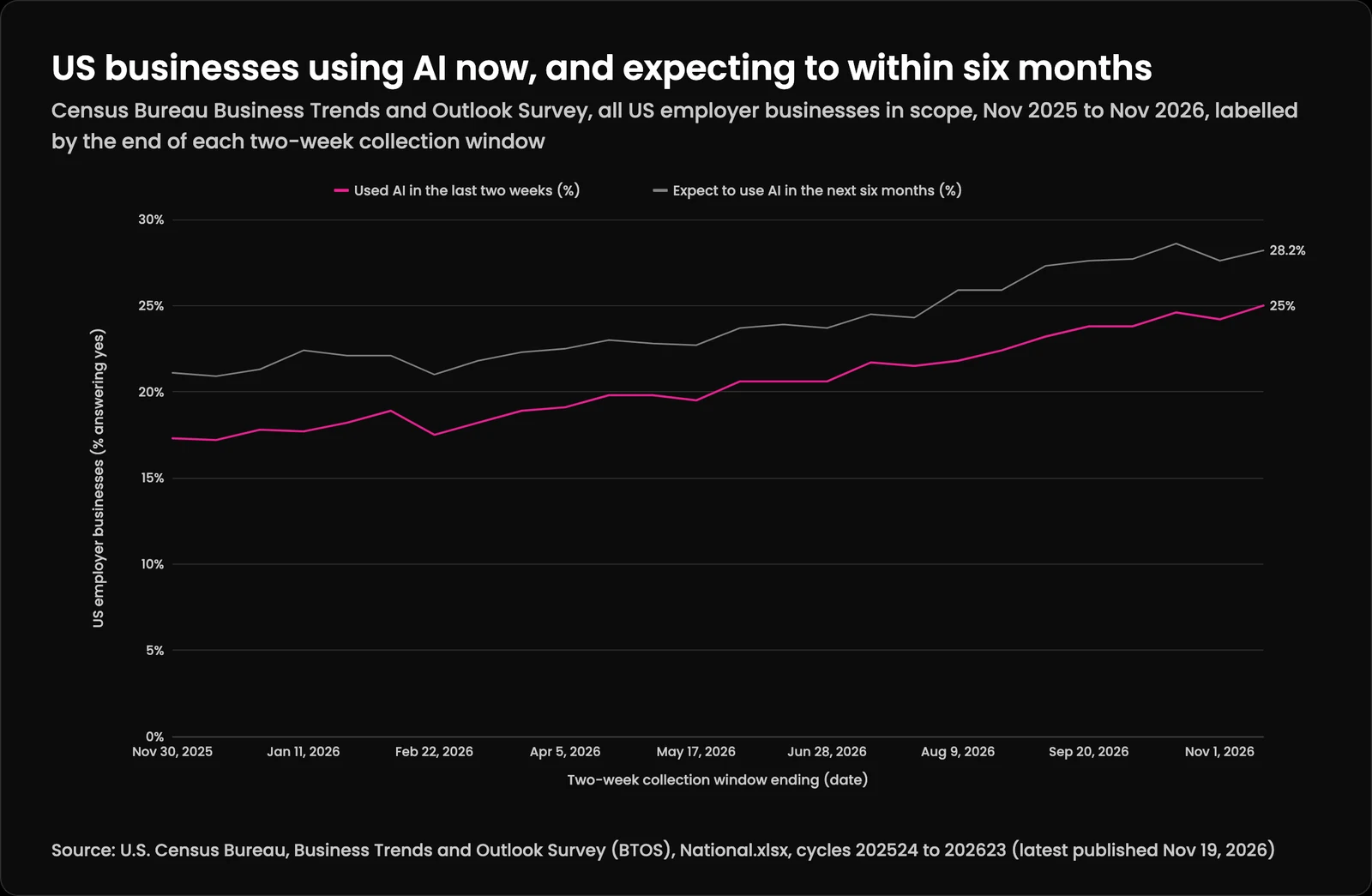
Expect the list to be longer than the approved software list. In BetterCloud's 2026 State of SaaS report (July 15, 2026, a survey of 525 IT and security professionals), only 56% of the apps in use carried IT approval, and 21% of organizations had discovered new, unsanctioned SaaS and AI tools in use. Use has grown over the past year too. In the Census Bureau's Business Trends and Outlook Survey collected November 2 to 15, 2026, 25.0% of US businesses said they had used AI in the prior two weeks, and 28.2% expected to be using it within six months.
Expected AI use ran a few points ahead of current use all year. Census's current questionnaire, dated October 2026, asks about "Super Intelligence or SI (formerly referred to as Artificial Intelligence or AI)," and "do not know" answers rose from 9.6% to 13.9% in the survey collected October 19 to November 1, so read the last two points with that in mind.
US businesses using AI now, and expecting to within six months (U.S. Census Bureau, Business Trends and Outlook Survey (BTOS), National.xlsx, cycles 202524 to 202623 (latest published Nov 19, 2026))
Collection window ending
Used AI in the last two weeks (%)
Expect to use AI in the next six months (%)
Nov 30, 2025
17.3%
21.1%
Dec 14, 2025
17.2%
20.9%
Dec 28, 2025
17.8%
21.3%
Jan 11, 2026
17.7%
22.4%
Jan 25, 2026
18.2%
22.1%
Feb 8, 2026
18.9%
22.1%
Feb 22, 2026
17.5%
21%
Mar 8, 2026
18.2%
21.8%
Mar 22, 2026
18.9%
22.3%
Apr 5, 2026
19.1%
22.5%
Apr 19, 2026
19.8%
23%
May 3, 2026
19.8%
22.8%
May 17, 2026
19.5%
22.7%
May 31, 2026
20.6%
23.7%
Jun 14, 2026
20.6%
23.9%
Jun 28, 2026
20.6%
23.7%
Jul 12, 2026
21.7%
24.5%
Jul 26, 2026
21.5%
24.3%
Aug 9, 2026
21.8%
25.9%
Aug 23, 2026
22.4%
25.9%
Sep 6, 2026
23.2%
27.3%
Sep 20, 2026
23.8%
27.6%
Oct 4, 2026
23.8%
27.7%
Oct 18, 2026
24.6%
28.6%
Nov 1, 2026
24.2%
27.6%
Nov 15, 2026
25%
28.2%
Where AI hides inside bills you already pay
The second door is quieter. BetterCloud found organizations now deploy an average of 27 AI-powered SaaS applications, roughly 22% of the total portfolio, and some of that AI arrives inside tools a company already owned. A help desk, a CRM, a design suite or a meeting tool may have moved the whole account to a higher tier with an AI feature attached at renewal.
For each SaaS contract, read the last two invoices side by side. Look for a new line item, a new tier name or a price change at renewal, and note whether anyone asked for the AI feature that came with it.
Forgotten API keys, buried expense reports and add-ons all turn up, but the biggest leak I find is usually overlapping third-party tools. Since the AI boom, vendor after vendor has raised prices by bolting on AI features nobody asked for, while teams keep buying separate point solutions for one-off tasks. We've seen companies in regulated industries buy several platforms just to pull different pieces of data out of each tool's built-in AI. What they don't realize is that every one of those third-party wrappers gets their proprietary data, which exposes them and their customers to tracking and compliance problems a regulated business cannot accept. Mark each overlap in the sheet; Step 7 decides what happens to it.
Cloud bills are the third place to look. Some model access is billed through a cloud provider account rather than directly by the model company, so the cost sits inside a larger invoice under a service or SKU name. Google's documentation for Cloud Billing reports describes grouping costs "by project, service, SKU, or location," which is enough to pull the AI lines out of a mixed bill.
The FinOps Foundation calls direct model provider APIs the hardest AI channel to manage, partly because their billing lacks business context.
Step 2: Attribute each line to a team, a person and a use
Attribution turns a pile of charges into something a team lead can answer for. Give every row in the sheet a team, a named person and one sentence on what it is for. Seats are easy, because each seat belongs to a login. Metered API spend is harder, and the FinOps Foundation's paper on managing token costs (updated October 28, 2026) explains why: developers buy direct API access themselves, the billing carries no business context, and allocation mechanisms are thin.
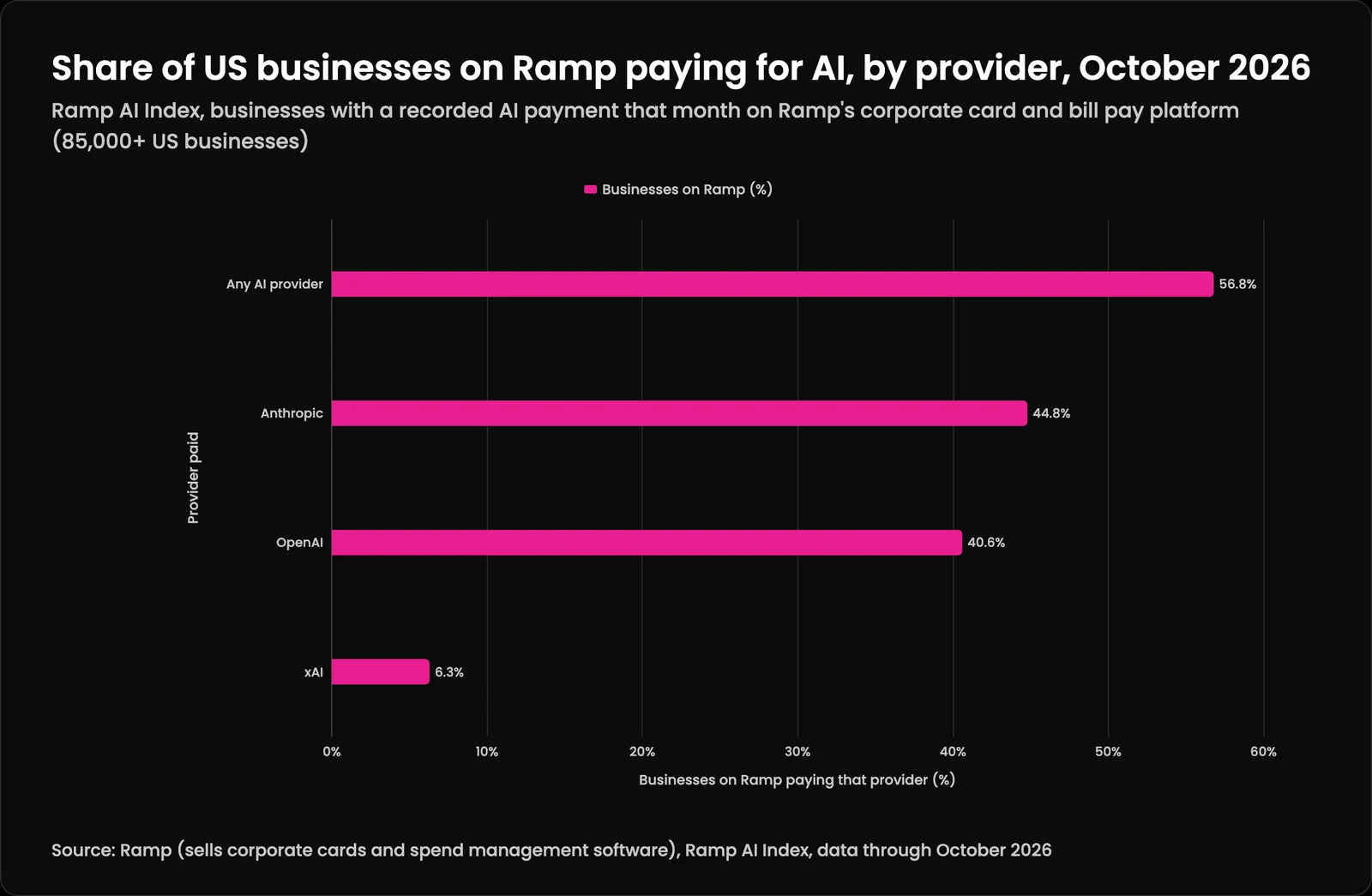
The providers do give you the raw material. OpenAI's Costs API returns daily costs that can be grouped by project, user, line item, API key and API source. Anthropic's usage and cost report endpoints break usage down by API key, workspace and model and group cost by workspace, and its newer Usage and Cost Analytics API, in beta, adds the user or service account behind each request. Many companies will need both reports. In the October 2026 AI Index from Ramp, which sells corporate cards and spend management software, 44.8% of US businesses on Ramp paid Anthropic and 40.6% paid OpenAI.
The Anthropic and OpenAI shares add up to more than the 56.8% total, so at least 28.6% of businesses on Ramp paid both in October 2026.
Share of US businesses on Ramp paying for AI, by provider, October 2026 (Ramp (sells corporate cards and spend management software), Ramp AI Index, data through October 2026)
Provider paid
Businesses on Ramp (%)
Any AI provider
56.8%
Anthropic
44.8%
OpenAI
40.6%
xAI
6.3%
Both providers' reporting APIs need an admin-level credential, and Anthropic notes its Admin API is not available to organizations on the claude.ai Team plan. If no one in the company holds that kind of credential, the usage and cost pages in each provider's console are a fine first pass.
One key per job makes attribution almost free
Every grouping above depends on how keys and projects were set up. If one shared key powers the support bot, the sales team's email drafts and a developer's experiments, the report shows one number and nobody can split it. If each job has its own project or workspace and its own key, the report sorts itself by job.
Watch for spend that cannot be attributed by design. Anthropic's documentation says requests made from its console without an API key, such as playground tests, carry no API key ID in the reports. Any line like that goes in the sheet as "unassigned" until someone claims it.
The FinOps paper describes a simple maturity path: first no allocation, then showback (each team sees its own cost), then chargeback against team budgets. A company running its first pass only needs showback.
Step 3: Measure use, not seats
A paid seat records what you bought. Activity data shows what anyone did with it. For every seat plan, record seats paid, people active in the last 30 days, and the date each person was last active, from the vendor's admin console where it offers one. Where a vendor offers no activity data, ask for it before the next renewal.
Unused licenses are common enough that the gap is usually worth finding. Zylo's summary of its 2026 index puts average license utilization at 54% in 2025, up from 47% in 2024, across SaaS generally. AI seats bought in a rush for a pilot are a natural place to check first.
Then compare the two pricing models. The FinOps Foundation suggests cost per active user per month, total AI spend divided by active users, as the number to hold against seat-based alternatives. A team of four light users on seats might cost less on metered API access, and a team of heavy users might cost less on seats. Brian Gagne's breakdown of bring-your-own-key AI cost works through that comparison for a 10-person team.
Be careful what you reward. If teams learn that low activity means losing a seat, activity numbers will rise without any more useful work, which is the pattern described in why your team games every metric. Treat the activity data as the start of a conversation with the owner. Anyone learning how to audit AI spending can borrow the one question I ask to tell whether a tool is used or just paid for: "What part of your weekly workflow would actually break if we revoked your licenses tomorrow?" A specific answer, such as a report or a reply that would stop going out, means the tool is doing work. A vague one goes on the list, and the decision waits for Step 7.
Step 4: Tie spend to the work it produces
Cost per seat and cost per token say nothing about value, so the center of how to audit AI spending is cost per unit of finished work. The FinOps for AI overview (updated October 28, 2026) recommends tracking cost per successful outcome, and the Foundation's token cost paper is blunt about the rest: "Failed and discarded runs are still cost."
Pick one unit per use. A dental group drafting appointment reminders might count reminders a staff member approved and sent. A logistics company extracting data from carrier invoices might count invoices that posted without a correction. A nonprofit drafting grant reports might count drafts that went out after a single review.
Divide the month's cost for that use by the count. A rising cost per outcome is the signal to investigate.
Count the full cost while you are there. The FinOps overview says tokens are one part, and that data stores, orchestration and observability belong in the number too. Add the staff hours spent reviewing output as well. For AI, as for any other tool, the sticker price is the smallest line item.
Where the unit is hard to name, that is a finding in itself. An AI tool nobody can tie to a piece of work is a candidate for the cut list in Step 7, or for the deeper review covered in an AI audit for your business.
Okta's Businesses at Work 2026 reports 91% of organizations already use AI agents, while only 10% have a well-developed strategy to manage them.
Step 5: Find the spend with no human at the keyboard
Agents, scheduled jobs and integrations spend money on their own, so they need an owner who is not the person who happened to set them up. Okta's Businesses at Work 2026 (April 30, 2026) reports that 91% of organizations surveyed already use AI agents and only 10% have a well-developed strategy to manage them. Okta also saw 650% year-over-year growth in the number of service accounts being centrally managed.
For each key or agent in the sheet, answer four questions: who created it, who owns it now, what it is allowed to spend, and how to stop it. The identity side of that, treating an agent as its own login with its own owner and expiry, is covered in what a non-human identity is for an AI agent.
Spending caps belong in any plan for how to audit AI spending, because an agent can run up a bill between reviews. OpenAI's documentation on spend limits lets anyone with permission to manage a project set a monthly spend limit and turn on a hard limit, after which API responses for that project fail with a 429 error. The same page notes that spend alerts "do not enforce a cap" and that recorded spend "can slightly exceed the configured amount."
Picture a law office whose document-summary job loops on a malformed file over a weekend. With an alert, someone reads about it on Monday. With a hard limit on that project, its API calls start failing at the cap, and the cost of the loop is bounded, give or take the small overrun the documentation warns about.
When you work out how to audit AI spending on keys, treat the key and its bill as one thing with one owner, and keep the controls in one place. At Kief Studio we do this with LTFI, our own system. It tracks all AI spend together and runs on BYOK (bring your own key), so a company can use any model, local ones included, to keep costs down. Each model can carry its own cap, and when a limit hits, work rolls over to the next approved provider. Owners get a warning before they max out, a small buffer overage keeps a task from stopping midway, and if anything is left incomplete, someone is pinged on Slack, Discord and email. People can chat with it from a phone, but a person approves every spend. Whatever you use, we don't advise letting AI spend money without a human in the loop.
Some agent spend is attributed to accounts you did not create. Anthropic's documentation says usage from some of its managed agent sessions is reported under an Anthropic-managed service account. Add a row for anything like that, so the total in your sheet matches the invoice.
Step 6: Set owners and a monthly cadence
The cadence is the part of how to audit AI spending that keeps the sheet true. Give every line one owner, the person who answers for its cost and decides whether it stays, and review the sheet monthly. Zylo's index page reports that 78% of IT leaders saw unexpected charges tied to AI features or consumption-based pricing in the past year, and 61% cut projects because of unplanned SaaS cost increases.
Monthly fits the data the providers give you. OpenAI's Costs API reports in one-day buckets, and Anthropic says its usage and cost data typically appears within five minutes of a request. A monthly review catches a runaway project in weeks instead of at the annual renewal.
Keep the meeting short and the same every time. Owners report the month's cost against last month, the outcome count from Step 4, and any new tool, key or agent. The FinOps overview notes that product, marketing, sales and leadership teams now drive AI spend directly, so expect owners from well outside IT and finance.
Write the result into policy once it settles. A spending limit per person and per agent, and a pause switch for anything that runs alone, are part six of the AI acceptable use policy for a small business. The audit gives those limits real numbers.
The FinOps Foundation cites its State of FinOps 2026 survey: 98% of respondents now manage AI spend, up from 31% two years earlier.
Step 7: Decide what to cut, consolidate or build
The last step in how to audit AI spending is the decision, made line by line with the owner in the room. Each line gets one of four outcomes: keep as is, cut, consolidate with another tool that does the same job, or replace with something the company runs itself.
Cut seats with no activity after the owner has had a chance to explain them, and tools no one can tie to an outcome. Before cutting personal subscriptions staff pay for and expense, offer a sanctioned option that is at least as easy to use. Governing shadow AI by enabling it explains why a ban alone tends to push the use out of sight.
Consolidate where two tools do the same job, such as two chat assistants bought by different departments, or a standalone AI writing tool next to an AI add-on in software the team already uses. Brian Gagne's piece on software spend per employee covers how overlap builds up and how to keep it from coming back. For the companies we've helped, we cut out as many of those third-party tools as possible and built in the exact capabilities they actually needed.
Build when a use is steady, central to the business and costly on a seat or per-task price. An online retailer writing thousands of product descriptions a month, or a manufacturer classifying supplier documents every day, may get a lower cost per outcome from a workflow on its own API keys. Keep the parts that matter under your control, as own versus rent AI lays out, and if a developer builds it for you, settle in writing who owns the code before the work starts.
Where Kief Studio fits
Kief Studio builds and runs the systems behind several of these steps. Splitting API keys by job and reporting cost per outcome is part of our AI automation work, pulling billing exports into one view is data engineering, and keeping it running month to month falls under managed services. For teams without the time or bandwidth to manage it internally, we build and run the tools on our end, and AI usage can be included or scoped up front before anything is signed. If you would like a hand working out how to audit AI spending across your own teams, reach out to us.
How do companies typically audit their AI spending across teams?
A workable method starts from the money: card statements, expense reports, SaaS invoices and model provider billing. Each line gets a team, an owner and a use, seats are compared with active users, and owners review the sheet monthly.
How can we audit AI spending by team?
For how to audit AI spending by team, give each team or job its own project, workspace and API key, then group the provider's cost report by those fields. Seats attach to named users. Anything that cannot be attributed is marked unassigned until an owner claims it.
Do you need a FinOps tool to learn how to audit AI spending?
Not for the first pass. A spreadsheet, the billing exports each provider already offers and a few hours from team leads are enough. A dedicated tool makes more sense once you know which numbers you want to track monthly.
How do you find AI subscriptions employees put on expense reports?
Export twelve months of card transactions and expense reports and search for provider names and words like AI, GPT, credits and tokens. Sort by merchant, since one tool often appears on several cards at the individual price.
How often should a company audit AI spending?
Monthly for metered API and agent spend, since provider cost data is reported at least daily and a runaway job can grow fast. Seat plans can be checked quarterly and always before renewal, using active users from each admin console.
What is a good metric for AI spending?
Cost per successful outcome, such as cost per approved reminder or per invoice posted without correction. The FinOps Foundation also suggests cost per active user per month for comparing metered access with seat-based plans.
Who should own AI spending in a mid-size company?
Each cost line needs one named owner who answers for it, usually the team lead who uses it. An operations or finance lead runs the monthly review across teams, because product, marketing and sales teams now drive AI spend directly.
What is the first step in how to audit AI spending?
Build the inventory from the books. Pull a year of card transactions, expense reports, SaaS invoices and model provider bills into one sheet, then give every line a team, a named owner and a one-sentence use.
An AI audit for a business is an inventory plus an evidence check on every AI system in use. IBM's 2026 report found 92 percent of organizations hit by an AI-related breach lacked proper AI access controls. The inventory is where the surprise is.
51% of small business owners are AI explorers, testing tools without fully committing, and 34% of them see no clear return yet. Here's how to audit what AI is actually doing for you, and what's just noise.
62% of large organizations were building, deploying or developing AI agents in September 2026, KPMG found. After a year and a half of agentic AI in production on LTFI, our lessons are about approval lines, logs, written rules, cost, drift and people.